 LoginSchedule demoLoginSchedule demo
Looking for the best LinkedIn profile optimization tips? Start building a better professional profile with this complete guide.

![Optimizing Your LinkedIn Profile [The Simple Guide]](https://everyonesocial.com/wp-content/uploads/2021/04/Optimizing-LinkedIn-Profile.png)
If you have been on LinkedIn for some time now, you might remember that in the early days the social platform was primarily used as an online resume.
But over the years, LinkedIn has not only become a way to get hired or find talent but to build a professional network and a personal brand.
Additionally, LinkedIn is also the place to build relationships with customers, showcase your expertise and knowledge, close more deals, and grow your company’s employer brand.
The evolution has been fascinating to watch, and the social platform now boasts over 740 million members in more than 200 countries.
Long gone are the days of just setting up a generic profile. Today, you need to be more strategic and think about how you want people to perceive you on the social network. Below is our guide to optimizing your LinkedIn profile to be successful today and beyond.
An optimized LinkedIn profile is one where every part of your personal profile is filled out and shows audiences what you do, who you are, and what you are an expert in. This helps your profile rank higher in LinkedIn searches and builds trust among those who might want to connect or follow you.
Although I alluded to the impact of having an optimized LinkedIn profile, it’s important you fully understand why you should care to have a clean and well-thought-out profile.
Whether you are looking for a job, sprucing up your profile to participate in your company employee advocacy program, or want to be the next influencer – your LinkedIn profile is key to success.
Not everyone wants to be the next professional influencer or build a massive personal brand, but everyone should consider creating an optimized LinkedIn profile.
When it comes to optimizing your LinkedIn profile, there are a few steps and areas to focus on. Some are super basic and others are a bit more advanced that maybe you have not thought about before.
When setting up your profile, you want to ensure you upload a strong and clear profile picture.
Something that shows your face ensures your networks and recruiters trust who you are. For best image quality and fitting, ensure your profile picture for LinkedIn is at least 400 X 400 px.
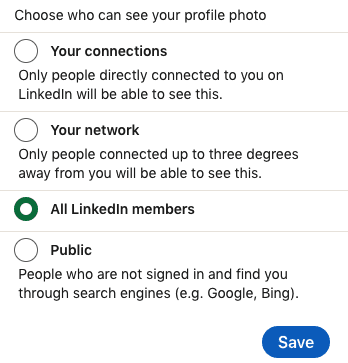
Also, when you click your picture on your profile, you have some settings to consider for how your image is shown. We recommended doing the option of “All LinkedIn Members” or “Public” to allow search engines to find your profile more easily.
While your profile picture is more focused on you, there is also the background image on your profile that you should utilize, as well. This can be related to your work or passions, but also can be more creative about the company you work at currently.
This may also be referenced as the banner image or wallpaper for your profile. Ensure the image is 1584 px wide by 396 high px (4:1 proportion) for best quality.
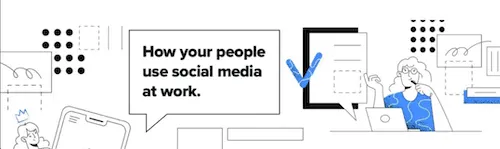
Our EveryoneSocial team has a few designs created for employees if they want to use, or they can create something of their own. For example, here is one of our banner images:
If you are passionate about networking and building a unique personal brand, it pays to be a bit creative and descriptive with your profile headline. In the early days of LinkedIn, it was primarily about the title of your current position and that was usually it.
But today it’s more important to use the 220 character space to include relevant keywords and descriptive of your expertise.
For example, which of these do you think stands out most and will resonate with recruiters or others in your industry?
While both include a keyword, the second one flows much better, is more interesting, and also is descriptive of your current role.
Play around with various headlines, switch them up occasionally, and don’t be afraid to get creative!
One LinkedIn profile optimization tip you should focus on is your summary. This is a great place to tell your story in 2,000 characters or less. Utilize keywords and update as often as you need to ensure relevancy and accuracy.
The first 265-275 characters will show before someone will have to click “See More” for the rest of your summary content. Your opening lines should be how you “hook” a profile visitor in that tells who you are, what you care about, and what you aspire to do.
Right after this section, you should consider adding some awesome media you were involved in like documents, links, videos, etc. It’s a great way to show off your expertise and talent along with your summary.
While LinkedIn profile optimization is more than just talking about your work experience, you definitely should still fill this section out. How in-depth you want to go with each work experience is up to you, but focus on some of your main achievements.
Some tips when filling this section out:
Another great section to fill out is where you put your education and credentials.
While your overall experience matters in the work field, many recruiters and people in your network may be curious about your education and skills. Plus when you add skills, others in your network may start endorsing those qualities you select, improving your trust factor.
These are the sections on your profile to add your knowledge:
Bonus: While not as impactful as it was in the early days of LinkedIn, you could ask for some recommendations. This is useful if you are job hunting especially, but not something worth spending a lot of time on otherwise.
Want expertly crafted content to help refine your marketing, social selling, and recruiting strategies? Sign up for our newsletter and get a copy of our Personal Brand Starter Kit. 👇
One setting that is easy to neglect and overlook when optimizing your LinkedIn profile is your profile URL. You can actually edit that URL to be clean, like your first name and last name. And changing this is super easy to do when you know where to look.
Go to your profile and in the upper right corner, you’ll see “Edit public profile & URL.” Once the page refreshes, you’ll say in the upper right corner and then you can change the URL to something cleaner beyond a bunch of numbers and letters.
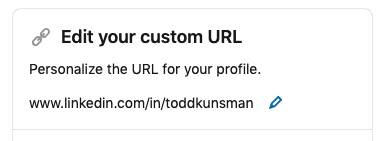
Beyond making the LinkedIn profile URL looking clean, it can help search engines index your profile and make it easier for people to find you on the network.
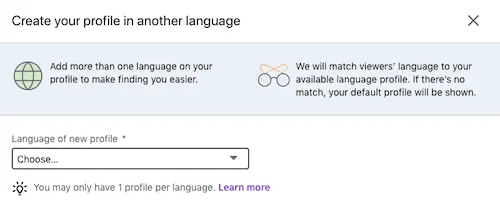
One feature you might not realize is available to your LinkedIn profile is the ability to create your profile in a language that is different from your default profile.
You can’t change the language of your primary profile, but you can actually create as many additional language profiles as you’d like – as long they are in the options available.
If you are multilingual and like to connect with people that speak other languages, this could be a cool feature to enable.
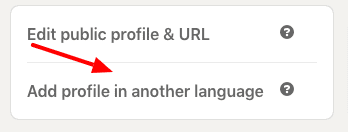
You can easily set this up by going to your profile on the right side, click “add a profile in another language,” and follow the prompts to get set up.
Do people have trouble pronouncing your name without hearing you say it? Is your name spelled a certain way that could be pronounced differently? A great way to get ahead of that is to enable the name pronunciation feature on LinkedIn.
This was added not too long ago, but as simple as it is, I think it was a solid addition. I’ve come across numerous profiles myself over the last year where Linkedin profiles are taking advantage of it.
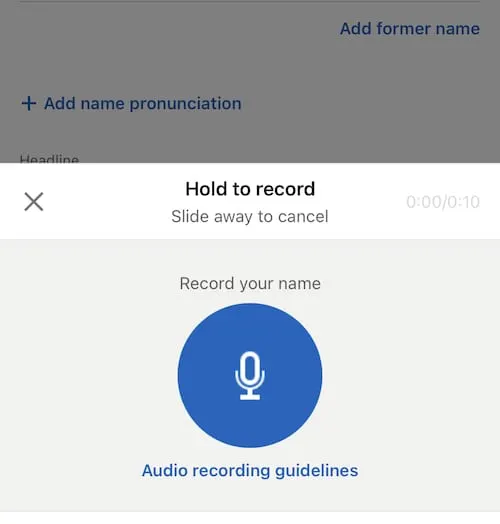
In order to add it and record your pronunciation, you have to access your profile from the LinkedIn mobile app. It does not allow you to record via desktop currently.
When you are on the app, go to your profile, click the pencil icon across from your profile picture, and have your name you’ll see a section that says “add name pronunciation.”
Click that and you can record right from the app and save it to your profile for people to hear before connecting with you.
Bonus: If you have an easy name to pronounce, you can also use this opportunity to record a brand statement. Maybe you record what you do, what you are about, your mission, etc. It allows some personalization to your profile and helps make it clear to profile visitors about your knowledge and work.
Oh, buzzwords. You probably have a few in mind that you see overly-used or make you cringe when you see them. These are adjectives that you’ll often see on LinkedIn headlines or summaries that add no real value to the profile.
Think of terms like “Experienced, Leader, Expert, Guru, Innovative, Certified, etc.
This doesn’t mean that there isn’t value in these terms at all in some instances. The problem is just because you use these terms to describe yourself, doesn’t mean they are convincing enough to people viewing your profile.
People will see you as an “expert” or “innovative” when you provide value through content, show your work experience off, and when you engage with others. That’s where you demonstrate what you are all about, not through utilizing buzzwords all over your profile.
As you start to clean up your LinkedIn profile, it’s time you also start engaging and getting active! There are many ways to do so, even if you aren’t into building a massive personal brand.
Start writing! Share insights into things you’ve learned in your career, expert insights into your industry or job position, and keep providing value. You don’t need to post every day, but find the cadence that works for you. It can be a mix of blog posts, text only, video, or image-based content.
The other aspect to being seen on LinkedIn and making connections is engagement. This is interacting with others’ content whether a comment, reacting, or resharing. You can tag your network on things (in moderation), too. This is how you boost credibility and reach, plus people love getting engagement and will likely return that on your content, too!
An easy way to get involved is if your company or team has an employee advocacy program in place, like EveryoneSocial. You’ll have access to all the best content worth sharing, can pull in feeds that interest you, and engage with company content easier.
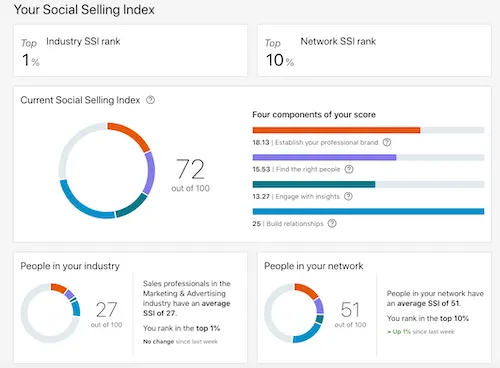
Getting your social selling index score might not be for everyone, but it could be interesting to see the number. Everyone’s profile gets a score based on profile optimization, networking, content, etc.
According to LinkedIn data, social selling leaders create 45% more opportunities than peers with lower SSI. This can be impactful for your personal brand, generating leads, or finding new opportunities in your career.
While this is not an exact way to optimize your profile, it does tell you how well your optimization efforts have one so far.
To get your score, head on over to the Social Selling Index page and click get your free score. If you are logged in already to LinkedIn, it will show your score. Otherwise, just log in when prompted.
Here’s what mine looks like:
Todd served as Director of Marketing at EveryoneSocial, leading content strategy and editorial across the blog through 2021. Today he is Head of Content & Brand at RemoFirst, founder of Linkeezy (an inbox and content tool for LinkedIn), and a SaaS marketing and content advisor.
See the platform that comms, marketing, and compliance teams use to run their advocacy program.
